



Play971 Login and Account Access
Accessing a Play971 account is built around a personal profile rather than separate identities for sportsbook, casino, and mobile use. The current registration interface states that the email address entered during sign-up becomes the login credential. Once registered, the same account sits within the operator’s wider internet gaming and sports wagering environment.
Play971 is operated by Coin Technology Projects LLC, which is currently listed by the UAE General Commercial Gaming Regulatory Authority as both an Internet gaming licensee and a sports wagering licensee. The platform also states that users must be at least 21 years old and that individuals from restricted jurisdictions are not permitted to register or use the service.
Account access therefore involves more than remembering a password. Correct personal information, secure credentials, location permission, and compliance with account rules all matter. Before registering, depositing, or playing, users should independently confirm that online casino or sports wagering activity is permitted in the jurisdiction from which they are accessing the service.
How to Sign In
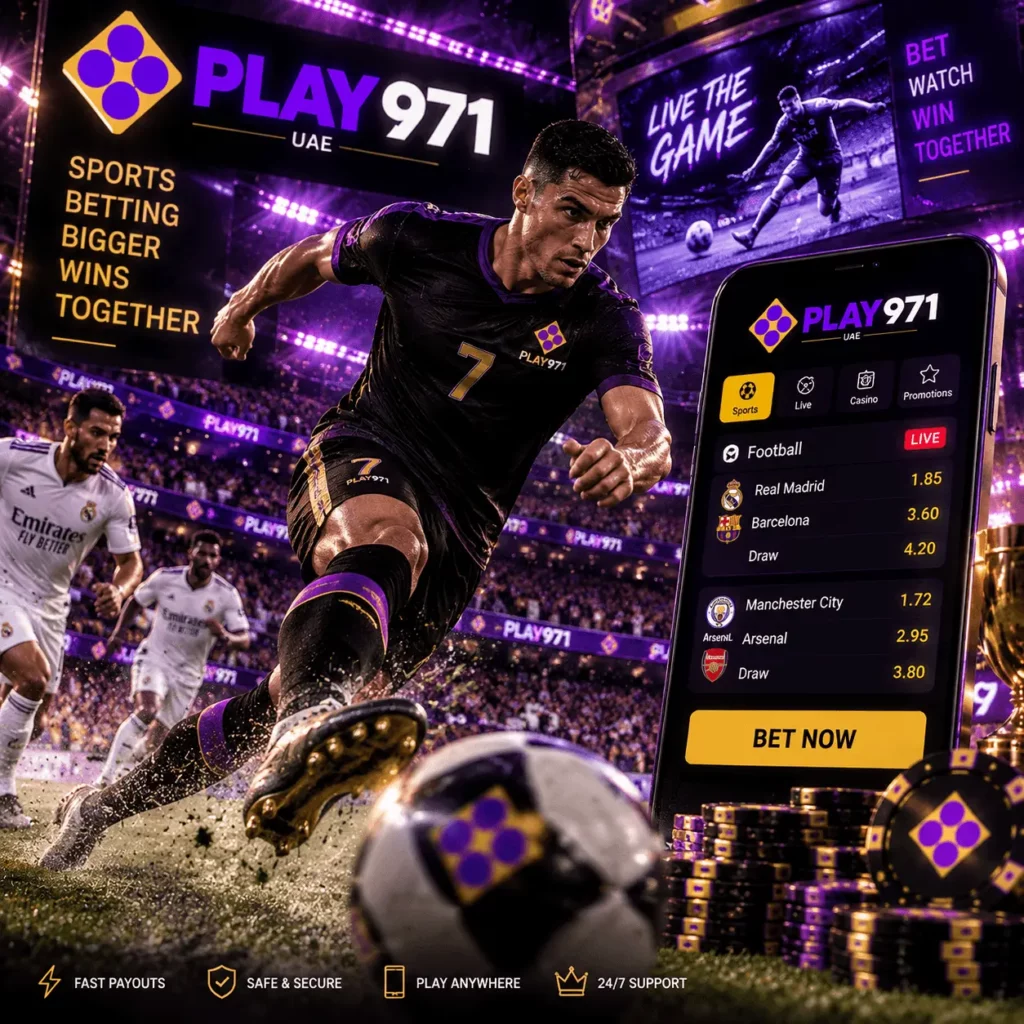
The current registration page confirms that the email address associated with the profile is used as the login credential. That makes the sign-in process relatively straightforward, but it is still worth checking each detail carefully rather than repeatedly attempting different credentials.
A sensible login sequence is
- Open Play971 through a recognized access point.
- Choose Log in rather than creating another account.
- Enter the email address originally used for registration.
- Enter the corresponding password.
- Allow any required location check to complete.
- Review the account shown after access and confirm that the profile information is yours.
- Continue to casino, sportsbook, or account functions only after the session has opened normally.
If access fails, start with ordinary causes. A mistyped email, extra space, wrong keyboard layout, or outdated password can be enough to block the session. Repeated guessing is not a suitable solution, particularly if the account may apply protective measures after unusual activity.
Changing devices does not normally create a reason to register again. The account remains linked to the user rather than to one phone or computer. If you are signing in from a shared device, avoid saving the password and log out when the session ends.
Before you continue, check both the email credentials and the device you are using. A careful login takes seconds; resolving a compromised account can take considerably longer.
Password Recovery
The public Play971 materials reviewed for this guide do not provide enough detail to describe one fixed customer password-recovery sequence without making assumptions. In particular, they do not establish a universal SMS code, email-link format, or mandatory verification order for every recovery case.
If the password is no longer accepted, first confirm that the correct registered email is being used. Then follow the recovery option presented through the current account interface. If that process is unavailable or does not resolve the problem, use Play971’s recognized support channels. The current public pages list Live Chat and a support email as assistance options.
Do not send your full password, payment credentials, or security codes to someone who contacts you unexpectedly. Play971’s Terms contain specific sections addressing viruses, phishing, and scammers, which is a useful reminder that a convincing logo or message does not prove that the sender is legitimate.
When setting a replacement password, use something unique that is not shared with email, banking, or social media accounts. Reusing one password across several services means a breach elsewhere can expose the gaming account too.
If recovery does not work through the recognized account flow, stop repeated attempts and contact official support rather than opening a duplicate profile.
Registration and Verification
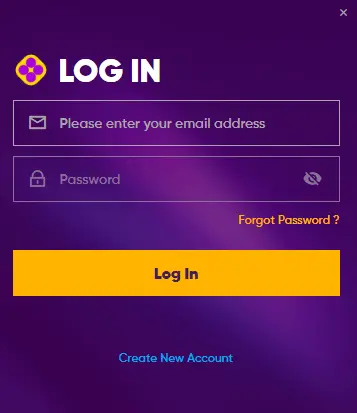
The current Play971 registration screen is divided into four visible stages: E-mail Account, Personal Info, Address, and Password. It also explicitly states that the email address becomes the login credential. Users must confirm that they are at least 21 years old and accept the Terms and Privacy Notice during account creation.
| Registration area | Confirmed purpose | Practical consideration |
| E-Mail Account | Establishes the login credential | Use an email you control |
| Personal Info | Collects account-holder details | Enter accurate information |
| Address | Forms a separate registration stage | Keep details consistent |
| Password | Secures account access | Use a unique password |
| Eligibility | 21+ requirement applies | Do not register if ineligible |
| Location | Geolocation is required | Allow the permitted-location check |
Accurate information matters because the operator processes personal data in connection with account and service use. Its current Privacy Notice identifies Coin Technology Projects LLC as an Abu Dhabi company and explains that personal data is collected and processed in connection with Play971.
The Terms also contain a dedicated section for validation requirements. Publicly accessible material does not, however, establish one universal list of identity documents or a guaranteed verification time for every user. It is therefore safer to follow the requests actually shown inside the account rather than assume that another player’s KYC process will be identical.
Before submitting information, review it carefully and make sure it belongs to the account holder. Correct data at registration makes later account administration considerably simpler.
Geolocation and Access Restrictions
Location verification is a confirmed part of Play971 access. The current registration and sportsbook pages display a notice stating that customers must have geolocation switched on so the system can check whether they are playing from a permitted location.
That means correct login credentials do not automatically guarantee full access. A device may still be unable to proceed if location services are disabled, permission has been blocked or the customer is attempting to use the platform from a restricted jurisdiction.
If location verification fails, check the following:
- whether an unusual network configuration is interfering with the check.onal profiles simply because one mobile session is not working.
- whether device location services are enabled;
- whether the browser or recognised application has permission to use location;
- whether the operating system and browser are current;
- whether the device can determine its location accurately;
- whether you are accessing from a jurisdiction where participation is permitted;
Do not try to solve a location restriction by creating another account, using an unofficial application, or falsifying location information. The GCGRA states that only properly licensed operators are authorized to conduct commercial gaming in the UAE and that participation through unlicensed operators is unlawful.
Location can also become relevant when travelling. An account created while physically present in one permitted area does not automatically guarantee access from every destination later.
If the settings appear correct but the location check still fails, use recognized support instead of looking for a workaround.
Account Security
Account security starts before the login form appears. A copied page can imitate colours, logos, and interface elements surprisingly well, so users should confirm they are accessing Play971 through a recognized source before entering their credentials.
The operator’s Privacy Notice describes how personal data is handled and includes a section dedicated to safeguarding that information. The terms separately contain provisions on privacy, viruses, phishing, and scammers. Together, these materials make security and confidentiality part of the wider account framework rather than an optional extra.
A strong password should be used only for this account. The email connected to the profile deserves similar protection because it serves as the login credential and may be important for account communications. Keep devices updated, use a screen lock, and avoid leaving an authenticated session open on hardware that other people can access.
Unexpected support messages deserve particular caution. Never disclose a complete password, card security code, or one-time authentication credential merely because someone claims to be investigating the account.
If suspicious activity appears, change the password from a trusted device and contact recognized support. Preserve relevant account and transaction information rather than deleting it, as those details may help explain what happened.
Review account security periodically—not only after something goes wrong.
Login FAQ
The current registration interface states that the email address entered when the account is created is used as the login credential.
A failed login should normally be treated as an access or recovery problem, not as an automatic reason to register again. Check the credentials, use the recovery option currently presented, and contact support where necessary.
The platform currently states that users must be 21 years or older to register and use the service.
Play971 states that customers must have geolocation enabled so it can determine whether they are playing from a permitted location.
The current visible flow contains stages for an email account, personal information, address, and password. Exact fields should always be taken from the live registration interface rather than an older third-party guide.
The Terms contain a dedicated Validation Requirements section, but the public material reviewed does not specify one universal document set or fixed approval period for every account. Follow the actual verification request displayed to you.
Use the recovery option available through the current account environment. If the process cannot be completed, contact recognized Play971 support. Do not send credentials through an unofficial channel.
Coin Technology Projects LLC operates the platform. The GCGRA currently lists the company as both an Internet Gaming Licensee and a Sports Wagering Licensee.
No assumption of universal access should be made. Play971 excludes users from restricted jurisdictions and requires location verification. Users should independently check whether gaming activity is permitted where they are physically located before using the account.
Secure account access is ultimately a combination of accurate registration details, protected credentials, and compliance with location and eligibility requirements. The login form itself is the easy part… maintaining control of the account is what matters over time.
Gaming also involves financial risk. Set a separate entertainment budget, use available player controls, and avoid chasing losses. The GCGRA places responsible gaming at the core of its regulatory framework, with the stated aim of reducing potential harm to individuals, families, and communities.